
POS screen description
iSmart OMO's built-in POS system, you only need to bring your ownTablet, Barcode scanner, Barcode receipt printer, the above are not limited to brands, you can start enjoying OMO technology.
POS(Point of Sale) system is a management tool commonly used in retail business. It has a variety of functions and can help your store operations and improve sales, operation and management efficiency.
The following areiSmart OMO built-inPOSSome main architectural functions of the system:
1, sales processing: POSThe core function of the system is to quickly process sales transactions. After creating product information, you can immediately synchronize the website and APP. Inventory will be automatically deducted and total sales will be calculated immediately. Checkout receipts or invoices can be printed.
2. Payment processing:POSThe system supports multiple payment methods, such as cash, credit card, electronic payment, etc., and generates relevant payment status. The system automatically classifies transaction methods in the background for easy management and query.
3. Purchasing, sales and inventory management: When new products are put into storage, with a barcode reader, you can use international barcodes, or the system can automatically generate barcodes and print them. The system will display the product inventory. When it is lower than the safety stock, red text will be displayed. When placing an order online or offline, the system will automatically reduce the inventory quantity of the corresponding product. This helps control issues such as inventory.
4.Return and exchange processing: When processing returns and exchanges, the order status is also corrected immediately, making it easier to check the damage rate of the goods in the future and automatically update the inventory.
5. Reports and analysis: iSmartThe system can generate various reports, including sales reports, inventory reports, turnover reports, etc. These reports help merchants analyze business performance and trends and make more informed operating or purchasing decisions.
6. Customer management: POSThe system can record customer information, including purchase history, preferences, etc. At the same time, you can join the membership physically and synchronize it to the online and APP, which helps merchants to more easily promote online shopping websites and quickly accumulate members, while promoting customer loyalty.
7.Promotions and discounts:POSThe system can synchronize the discount coupons set on the website with promotions and discount settings. Merchants can easily manage promotions, increase sales and attract more customers.
8. Employee and bonus management: iSmart POSThe system can set personal account passwords for employees to log in, track employee sales and calculate sales bonuses, set the amount of cash reserved for store openings, and record working hours and other information.
The system can centrally manage sales, inventory and other business information of multiple stores
iSmart OMOBuilt-inPOSThe system is an indispensable all-round tool in retail business, allowing your store to improve management efficiency, increase membership efficiency, improve precision marketing, reduce error rates, and improve customer service quality. The following is a partial POS screen.
⭕POS clear presentation and performance screen
Test path and account password
https://ismartdemo.com.tw/index.php?route=extension/tmdpos/login
testomo
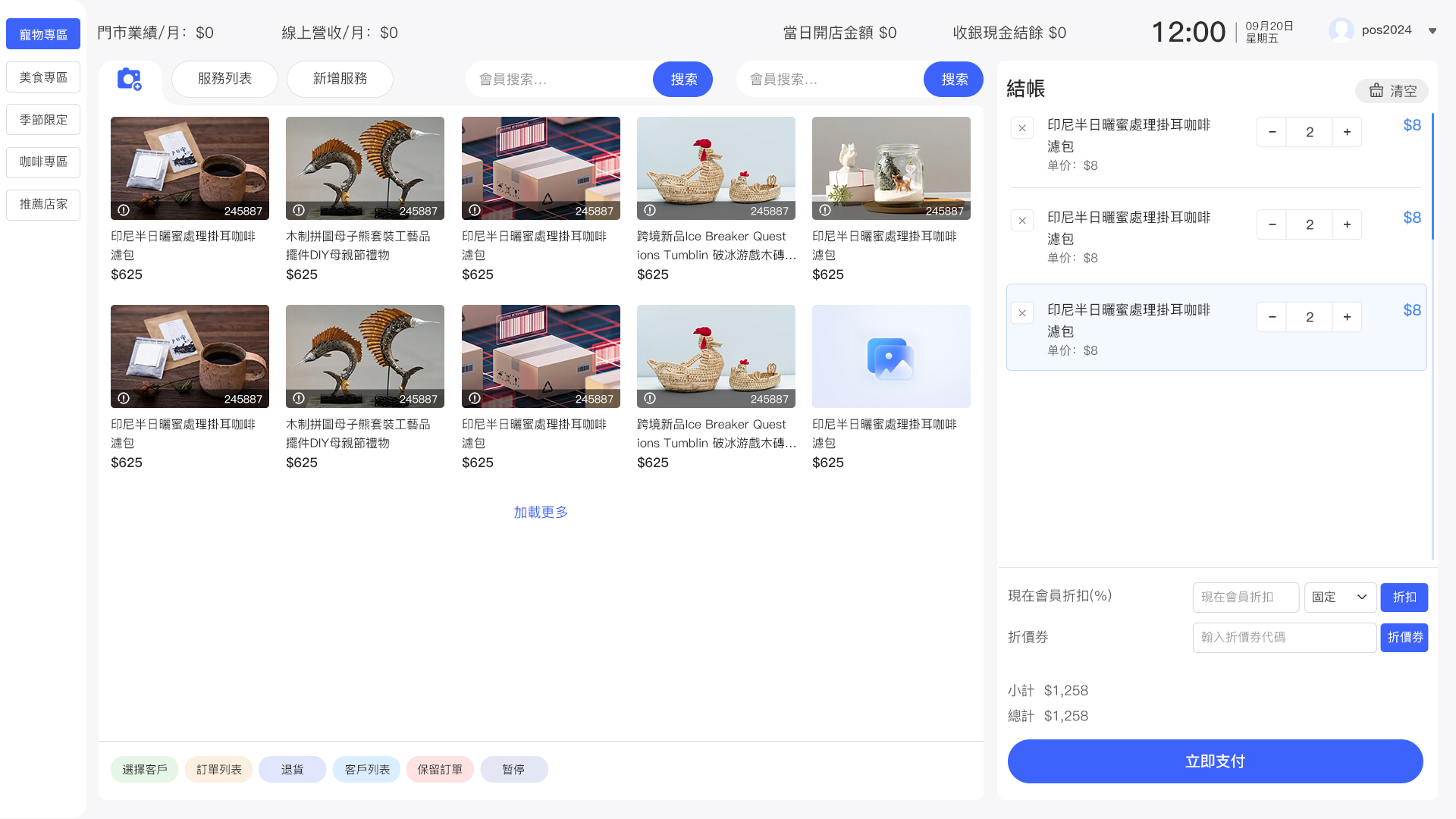
⭕Simple checkout screen
There are no products to list in this category.
